External Loads And Forces
External loads are the force inputs OpenSim uses during inverse dynamics. In monomech, they are represented by ExternalLoadsSpec objects and are usually created through the mm.external factory.
Use this page when you want inverse dynamics with force plates, pressure mats, estimated ground reaction forces, a carried object, or another force time series.
What Inverse Dynamics Needs
Inverse dynamics combines four things:
| Input | Purpose |
|---|---|
| Scaled model | The subject-specific OpenSim model. |
| IK coordinates | The joint motion file, usually ik.path. |
| External loads | Ground reaction forces or other applied forces. |
| Shared time range | The IK and force data must overlap in time. |
When you pass external_forces=... to mm.run_id(), monomech writes both files OpenSim expects:
*_external_loads.mot*_ExternalLoads.xml
Those paths are saved in id_result.metadata.
Choose A Load Source
-
Measured force plate
Use
from_dataframe()orfrom_csv()when you have force, center-of-pressure, and optional torque columns. -
Arrays from another tool
Use
from_timeseries()when your code already has NumPy arrays for time, force, point, and optional torque. -
Carried object
Use
carried_load()for a simple constant downward load on a body. -
No force plates
Use
estimate_grf()for pipeline checks, sensitivity analyses, and rough exploratory workflows.
Measured forces are still the standard
Estimated ground reaction forces can help test a full pipeline, but they are not a replacement for validated measured forces when interpreting kinetics.
From A DataFrame
Use this when you already loaded force data with pandas.
import pandas as pd
import monomech as mm

df = pd.read_csv("data/right_force_plate.csv")

right_grf = mm.external.from_dataframe(
    df=df,
    applied_to_body="calcn_r",
    force_columns=("ground_force_vx", "ground_force_vy", "ground_force_vz"),
    point_columns=("ground_force_px", "ground_force_py", "ground_force_pz"),
    torque_columns=("ground_torque_x", "ground_torque_y", "ground_torque_z"),
    time_column="time",
    name="right_grf",
    force_expressed_in="/ground",
    point_expressed_in="/ground",
)
The name becomes the OpenSim column prefix. Keep it short and unique, especially when passing multiple loads.
From A CSV
right_grf = mm.external.from_csv(
    "data/right_force_plate.csv",
    applied_to_body="calcn_r",
    force_columns=("Fx", "Fy", "Fz"),
    point_columns=("Px", "Py", "Pz"),
    torque_columns=("Mx", "My", "Mz"),
    time_column="time",
    name="right_grf",
)
From Arrays
right_grf = mm.external.from_timeseries(
    time=time_seconds,
    force=force_xyz,
    point=center_of_pressure_xyz,
    torque=free_moment_xyz,
    applied_to_body="calcn_r",
    name="right_grf",
)
force, point, and torque use shape (n_frames, 3). torque is optional. time, force, and point must have the same length.
Constant And Carried Loads
Use a manual constant load for a simple applied force:
manual_load = mm.external.constant_force(
    applied_to_body="hand_r",
    force=(0.0, -49.05, 0.0),
    point=(0.0, 0.0, 0.0),
    start_time=0.0,
    end_time=2.0,
    name="right_hand_load",
)
49.05 N is roughly a 5 kg object under gravity.
For the common carried-load case:
mm.load(type="carried", ...) creates the same OpenSim external load as mm.external.carried_load(...), but keeps the common notebook workflow concise. By default, the load is active for the full IK trial. Pass both start_time= and end_time= only when the load should be time-limited.
The force is expressed in ground coordinates and the application point is expressed in the body frame you pass with body=. For body="hand_r" and the default point=(0, 0, 0), OpenSim applies the load at the right-hand body origin. The visualizer reads the generated ExternalLoads.xml and IK motion, converts that body-local point into ground coordinates for each frame, and draws the arrow on the moving hand instead of at the scene origin.
Use point= to move the application point within the body frame:
brief_push = mm.load(
    type="constant",
    body="hand_r",
    force=(40.0, 0.0, 0.0),
    start_time=0.5,
    end_time=1.2,
)
body= must match a body in the OpenSim model. mm.run_id() checks this before launching inverse dynamics and records the validated body names in id_result.metadata["external_loads_validation"].
For a full video-to-ID run, combine estimated ground-reaction forces with the carried load in one argument:
dumbbell = mm.load(type="carried", body="hand_r", mass_kg=12.5)

result = mm.video_to_inverse_dynamics(
    "data/right_curl.mp4",
    model_path=mm.get_builtin_osim_model("pose"),
    output_dir="outputs/right_curl",
    body_mass_kg=82.0,
    external_forces=mm.external.with_estimated_grf(dumbbell),
)
For the staged API:
pose = mm.estimate_pose("data/right_curl.mp4")
pose = mm.gap_fill(mm.smooth(pose))

scaled_model = mm.run_scaling(pose, model="pose", output_dir="outputs/right_curl/scale")
ik = mm.run_ik(scaled_model, output_dir="outputs/right_curl/ik")

dumbbell = mm.load(type="carried", body="hand_r", mass_kg=12.5)
grf = mm.estimate_grf(pose, body_mass_kg=82.0)
forces = mm.external_forces(loads=[dumbbell, *grf])

id_result = mm.run_id(
    ik=ik,
    external_forces=forces,
    output_dir="outputs/right_curl/id",
)
Estimated Ground Reaction Forces
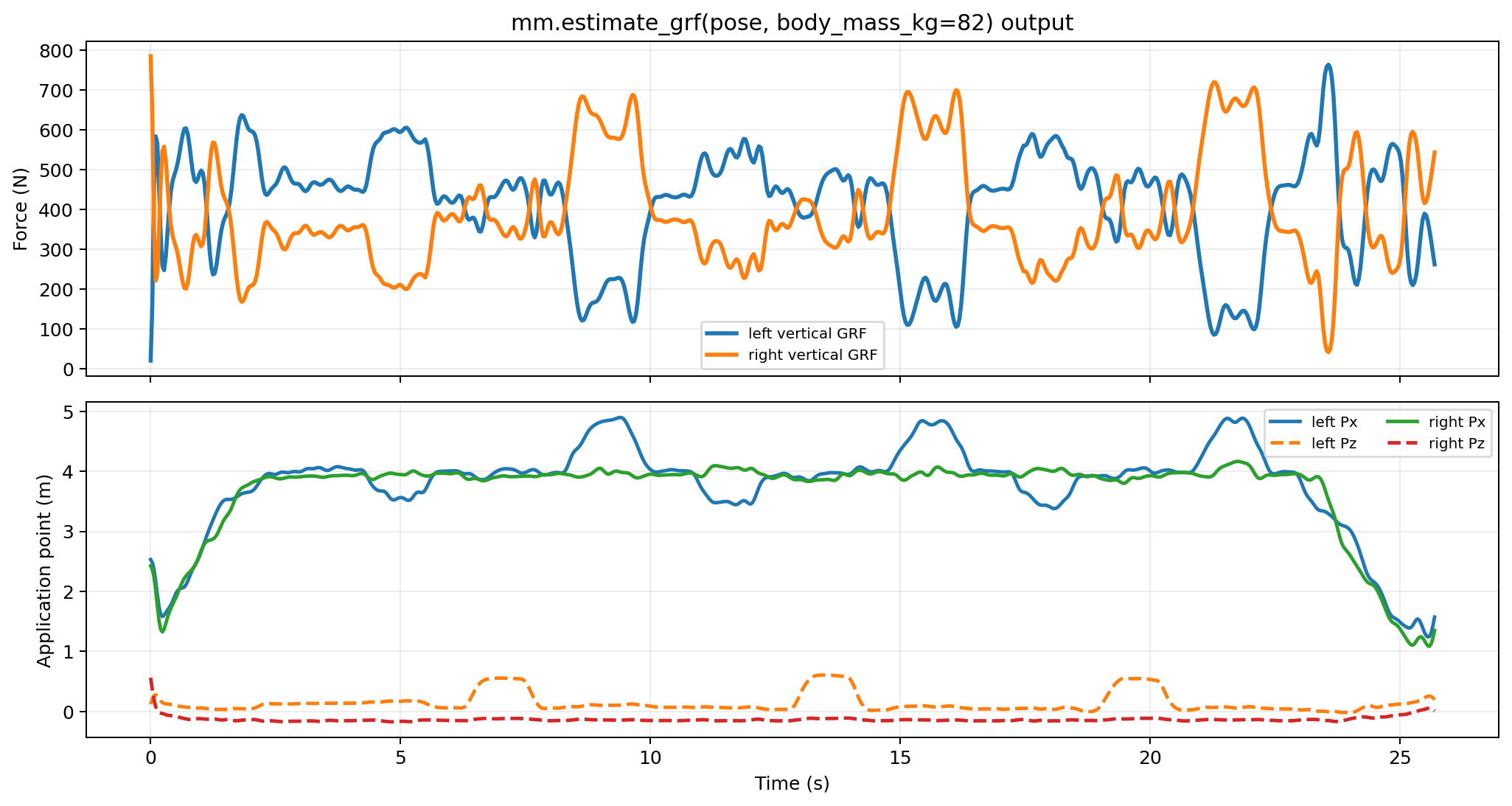
When measured forces are unavailable, estimate_grf() can create approximate vertical contact forces from global 3D pose foot landmarks.
estimated_loads = mm.external.estimate_grf(
    pose3d=run.pose3d_global,
    body_mass_kg=75.0,
    sides=("left", "right"),
)
This returns a list of ExternalLoadsSpec objects, one per detected side.
Full ID Example
import monomech as mm

pose = mm.estimate_pose("data/subject01.mp4")
pose = mm.gap_fill(mm.smooth(pose))

scale = mm.run_scaling(
    pose,
    model="pose",
    output_dir="outputs/subject01/scale",
)

ik = mm.run_ik(scale, output_dir="outputs/subject01/ik")

estimated_loads = mm.estimate_grf(pose, body_mass_kg=75.0)

id_result = mm.run_id(
    ik=ik,
    external_forces=estimated_loads,
    output_dir="outputs/subject01/id",
)

print(id_result.path)
print(id_result.metadata["external_loads_xml_path"])
print(id_result.metadata["external_loads_mot_path"])
Time Alignment And NaNs
OpenSim expects finite numeric inputs. monomech handles the common rough edges before launching the tool:
| Issue | Default handling |
|---|---|
| External force data has a different sampling rate than IK | Resampled to IK time. |
Force value is NaN, inf, or not numeric |
Converted to zero in the generated MOT. |
| Force data starts after IK starts | Values before the force window are zero. |
| Force data ends before IK ends | Values after the force window are zero. |
| IK coordinates contain NaNs before ID | Interpolated when sanitize_coordinates=True. |
Inspect the generated files:
print(id_result.metadata["external_loads_xml_path"])
print(id_result.metadata["external_loads_mot_path"])
print(id_result.metadata["coordinate_preflight"])
Strict Mode
Disable automatic fixes when you want failures instead of interpolation:
from monomech import OpenSimIDConfig

id_result = mm.run_id(
    ik=ik,
    external_forces=estimated_loads,
    config=OpenSimIDConfig(sanitize_coordinates=False),
)
Common Fixes
| Problem | Fix |
|---|---|
| Force data has a different sampling rate than IK | Pass the load to mm.run_id(); it is resampled automatically. |
| A force plate file has isolated NaNs | Let the generated MOT fill non-finite values, then inspect the file before interpretation. |
| ID succeeds but moments look implausible | Check force signs, center-of-pressure units, applied_to_body, and coordinate frames. |
| Estimated GRF produces no loads | Confirm global pose includes foot landmarks such as left_heel, left_foot_index, and left_ankle. |
| One side has no contact force | Inspect foot landmark height and contact assumptions before interpreting kinetics. |