OpenSim Scale, IK, And ID
OpenSim helpers write setup files, run OpenSim tools, read outputs back into result objects, and keep useful paths in metadata. Use the top-level API for notebooks and scripts, then drop to lower-level trial methods only when you need very specific control.
Requirements
Install OpenSim-compatible Python bindings before calling OpenSim methods.
You can also use a conda OpenSim installation as long as Python can import an opensim module.
The OpenSim Path
flowchart LR
  A["Pose, marker result, or TRC"] --> B["Scale"]
  B --> C["Scaled model"]
  C --> D["Inverse kinematics"]
  D --> E["IK coordinates MOT"]
  F["External loads"] --> G["ExternalLoads.xml + MOT"]
  E --> H["Inverse dynamics"]
  G --> H
  H --> I["Generalized forces STO"]
  E --> J["3D visualizer"]
  H --> J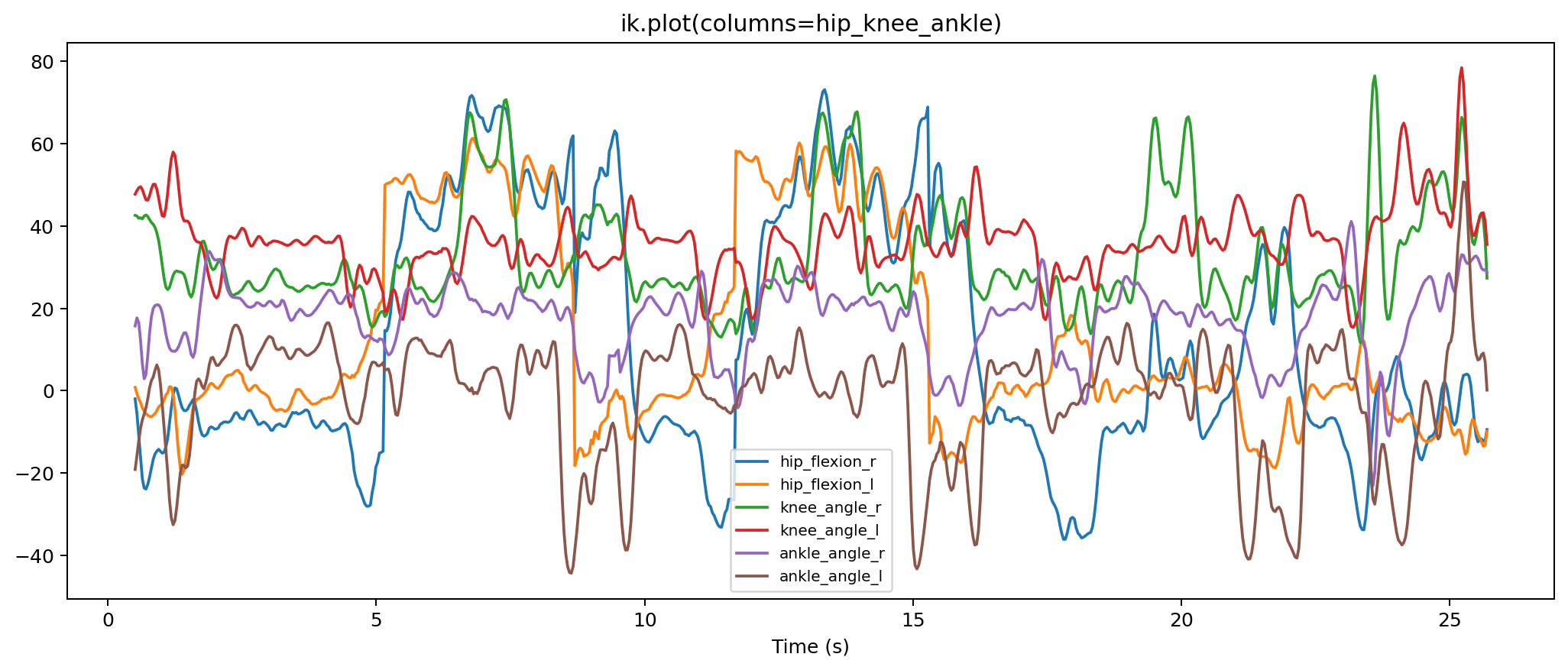
Built-In Models
import monomech as mm

print(mm.list_builtin_osim_models())
model_path = mm.get_builtin_osim_model("pose")
Built-in models keep their display geometry by default so animation export can resolve the packaged full-body meshes. For headless OpenSim runs where you only want IK/ID and do not need visualization geometry:
1. Scale
Start from a pose result, marker result, or TRC path:
pose = mm.estimate_pose("data/subject01.mp4")
pose = mm.gap_fill(mm.smooth(pose))

scale = mm.run_scaling(
    pose,
    model="pose",
    output_dir="outputs/subject01/scale",
)

print(scale.scaled_model_path)
print(scale.setup_xml_path)
print(scale.metadata["preflight"])
Use a stable subsection when the full trial contains extra movement:
from monomech import OpenSimScaleConfig

scale = mm.run_scaling(
    "outputs/subject01/subject01_global.trc",
    model=model_path,
    output_dir="outputs/subject01/scale",
    config=OpenSimScaleConfig(time_window=(0.25, 1.25)),
)
2. Inverse Kinematics
ik = mm.run_ik(
    scale,
    output_dir="outputs/subject01/ik",
)

print(ik.path)
display(ik.to_dataframe().head())
print(ik.metadata["marker_error_summary"])
ik.plot()
For faster iteration, use the direct OpenSim solver backend:
backend="base" is the default OpenSim tool workflow. backend="fast" keeps the model and IK solver alive across frames and warm-starts from the previous frame, which can be much faster for video trials while preserving the same marker data, model, and accuracy setting.
Add marker weights when some markers should matter more:
from monomech import OpenSimIKConfig

ik = mm.run_ik(
    scale,
    config=OpenSimIKConfig(
        marker_weights={
            "right_ankle": 5.0,
            "left_ankle": 5.0,
        },
    ),
)
For monocular video, pelvis orientation can be the first place noisy hip or trunk landmarks show up. Add a light coordinate task when the pelvis is tipping forward more than the movement warrants:
ik = mm.run_ik(
    scale,
    marker_weights={
        "left_hip": 3.0,
        "right_hip": 3.0,
        "left_shoulder": 2.0,
        "right_shoulder": 2.0,
    },
    coordinate_weights={"pelvis_tilt": 8.0},
    coordinate_values={"pelvis_tilt": 0.0},
)
Use the smallest coordinate weight that removes the artifact. Very high values can hide real pelvis motion.
3. External Loads
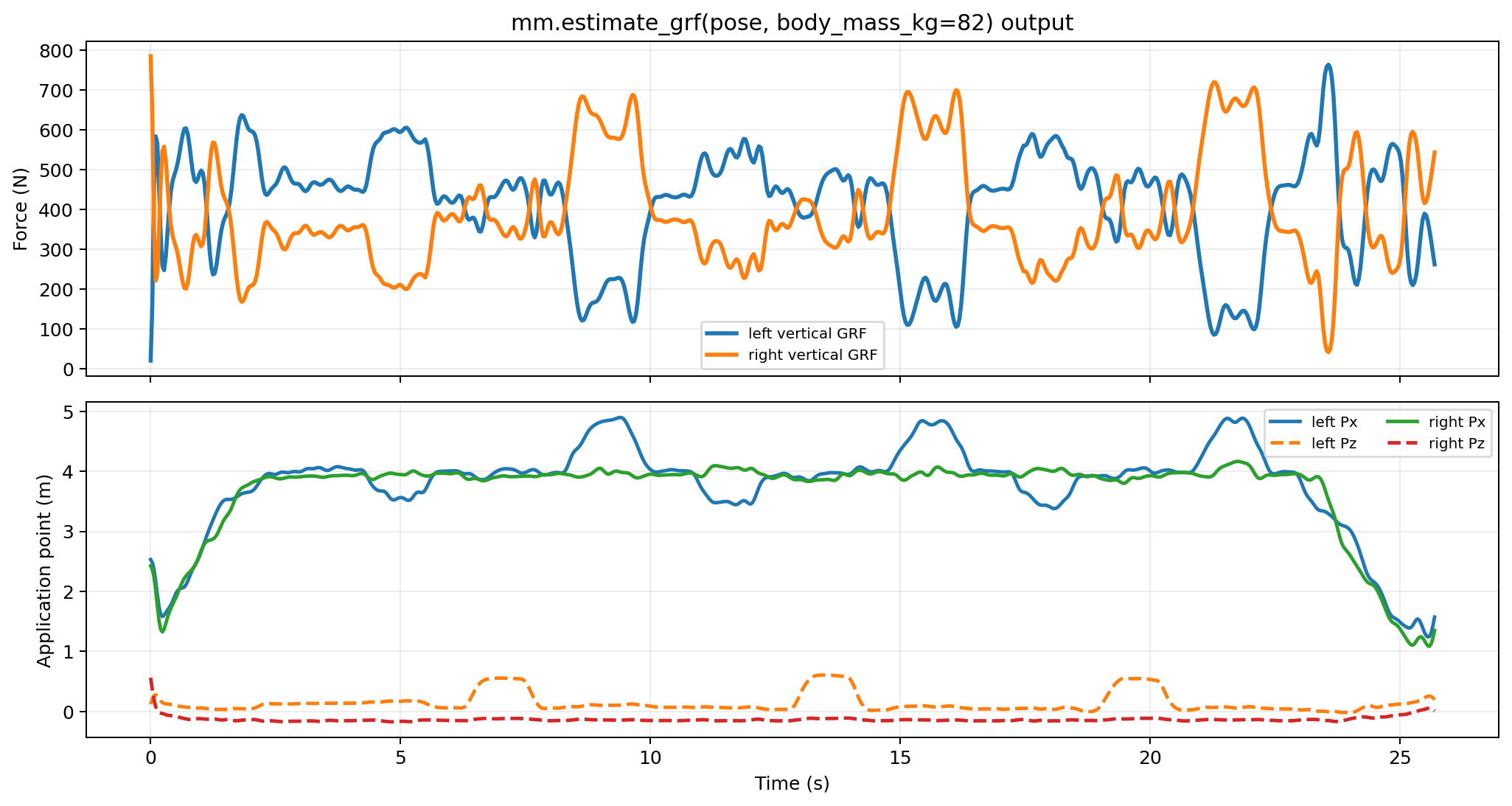
Inverse dynamics can run with no external loads for a setup check, but meaningful kinetics usually need measured or estimated external forces.
For a carried object:
dumbbell = mm.load(type="carried", body="hand_r", mass_kg=10.0)
forces = mm.external_forces(loads=[dumbbell, *estimated_loads])
For measured force data:
right_grf = mm.external.from_csv(
    "data/right_force_plate.csv",
    applied_to_body="calcn_r",
    force_columns=("Fx", "Fy", "Fz"),
    point_columns=("Px", "Py", "Pz"),
    torque_columns=("Mx", "My", "Mz"),
    time_column="time",
    name="right_grf",
)
See External loads and forces for measured force plates, arrays, manual loads, carried loads, estimated GRF, and troubleshooting.
4. Inverse Dynamics
id_result = mm.run_id(
    ik=ik,
    external_forces=estimated_loads,
    output_dir="outputs/subject01/id",
)

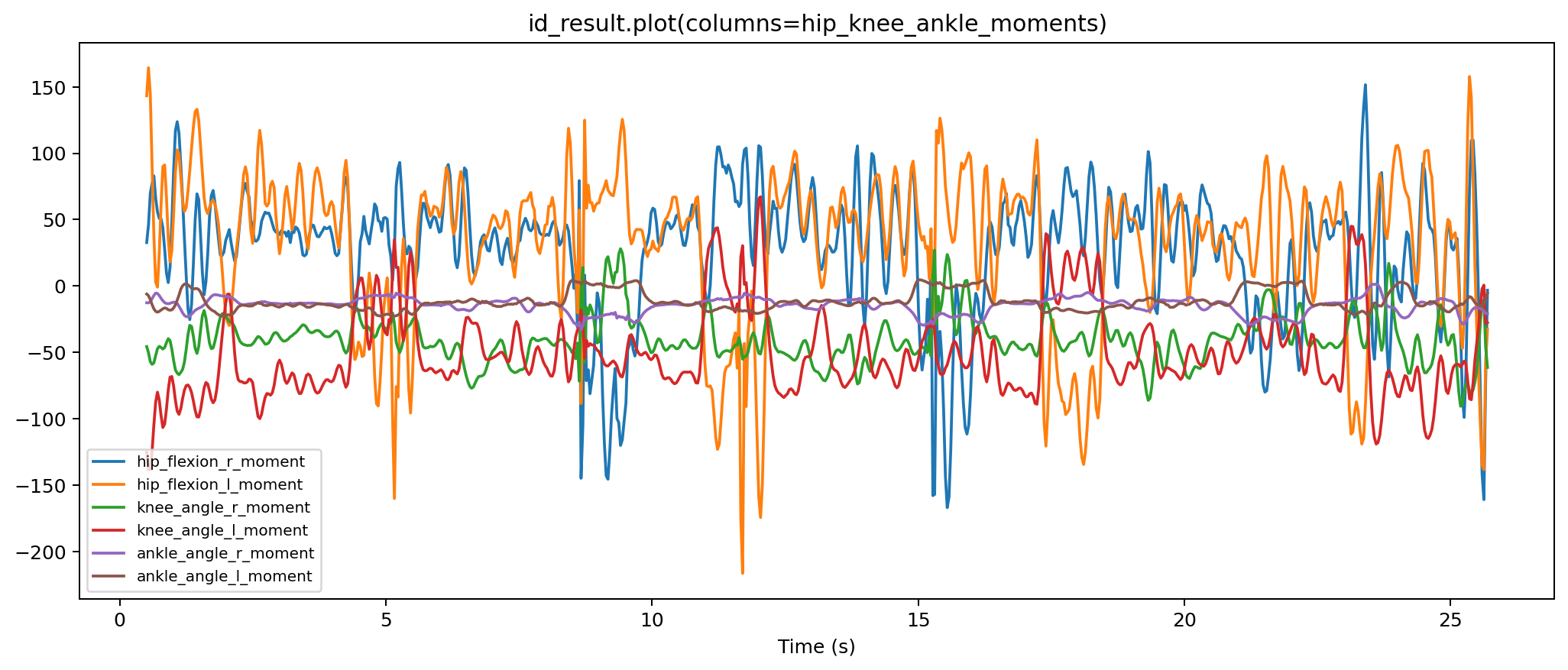
print(id_result.path)
display(id_result.to_dataframe().head())
id_result.plot()
Generated external-load files are reported in metadata:
print(id_result.metadata["external_loads_xml_path"])
print(id_result.metadata["external_loads_mot_path"])
print(id_result.metadata["coordinate_preflight"])
5. Animation Export
Create a notebook-ready Three.js visualizer:
viewer = mm.animate(
    ik=ik,
    id=id_result,
    external_loads_path=id_result.metadata["external_loads_mot_path"],
    output_dir="outputs/subject01/visualizer",
)

viewer.show()
See OpenSim animation export for GLB export options, viewer creation, marker-position exports, and file-size controls.
Preflight And NaN Handling
OpenSim is sensitive to NaNs and infinite values. The helpers run automatic preflight fixes by default.
| Stage | Default check | Output |
|---|---|---|
| Scale | TRC marker values must be finite. NaNs are interpolated. | *_opensim_ready.trc when needed |
| IK | TRC marker values must be finite. NaNs are interpolated. | *_opensim_ready.trc when needed |
| ID | IK coordinate values must be finite. NaNs are interpolated. | *_coordinates_opensim_ready.mot when needed |
| External loads | Forces and points are numeric and aligned to IK time. | *_external_loads.mot, *_ExternalLoads.xml |
Inspect preflight metadata:
print(scale.metadata["preflight"])
print(ik.metadata["preflight"])
print(ik.metadata["marker_error_summary"])
print(id_result.metadata["coordinate_preflight"])
Disable automatic fixes when you want strict failures:
from monomech import OpenSimIKConfig, OpenSimIDConfig

ik = mm.run_ik(
    scale,
    config=OpenSimIKConfig(sanitize_marker_data=False),
)

id_result = mm.run_id(
    ik=ik,
    config=OpenSimIDConfig(sanitize_coordinates=False),
)
Logs
OpenSim can print a line per frame during IK. monomech runs OpenSim tools in quiet mode by default and writes stage logs next to the outputs.
print(scale.metadata["log_path"])
print(ik.metadata["log_path"])
print(id_result.metadata["log_path"])
Set quiet=False when you want OpenSim output in the console:
Practical Checklist
Check marker names
Compare TRC marker names against the OpenSim model before scale and IK.
Inspect preflight reports
Review filled channels, all-missing channels, and generated OpenSim-ready files.
Review IK error
Use the marker error summary before trusting the IK coordinates.
Validate loads
Confirm force directions, point units, timing, and applied_to_body before interpreting ID.